

性能环境搭建(0-CentOS7 安装配置)
1.前言
根据现有的组件,准备动手搭建一套完整的监控环境。既然是练手,还是在虚拟机里自己先练习一下。出了问题也好恢复。所有就先从最基本的开始。那就是操作系统开始搭建玩起来。
2.环境
资源有效利用吧,公司的资源能自由使用的那最方便的便是工作的台式机的。看了一下我的台式机配置还不错。
宿主机配置信息:
内存:16G
CPU:Intel®Core™i5-10400 CPU @2.90GHZ
硬盘:500G
虚拟机:VMware16.1.2 build-17966106
3.准备安装介质
服务器一般当前最流行的也就是linux.这里安装的centos
官网地址:https://www.centos.org/
下载版本选项说明,打开官网会发现有官网提供了两个linux版本:CentOS Linux(简称cl)和CentOS Stream(简称cs);点击“https://www.centos.org/cl-vs-cs” 可以查看两者的区别。简单看了一下cl与cs最在的区别也就是cl是对cs的重建。所以我们选择cl就行,够使用了,简单嘛。
再就是下载地址:https://www.centos.org/centos-linux/ 这里提供了好多版本,选择要安装的系统,一般选择第一个就行了

选择不同的下载镜像,尽量选择国内的不用翻墙下载速度快如:aliyun,163等,没有的话那就选择其他的吧,那个都是可以下载的。

下载不同的iso。这里有dvd、everytihing、minimal、netintall几个版本。看看这几个ios的说明,根据实际需求下载。

| 版 本 | 说明 |
|---|---|
| CentOS ISO: | DVD是标准安装盘,一般下载这个就可以了,里面包含大量的常用软件,大部分情况下安装时无需再在线下载,体积为4G; |
| Minimal ISO: | 精简版本,包含核心组件,体积才600多MB; |
| Everything ISO: | 顾名思义,包含了所有软件组件,当然体积也庞大,高达7G。对完整版安装盘的软件进行补充,集成所有软件; |
| NetInstall ISO: | 网络安装镜像; |
| LiveGNOME ISO: | GNOME桌面版; |
| LiveKDE ISO: | KDE桌面版; |
| LiveCD ISO: | 光盘上运行的系统,类拟于winpe; |
我这的目的是做服务器监控练习的,所以选择的下载的版本是Minimal IOS下载.
4.安装 CentOS
具体安装操作步骤:
新建虚拟机


选择Install CentOS 7回车开始安装:
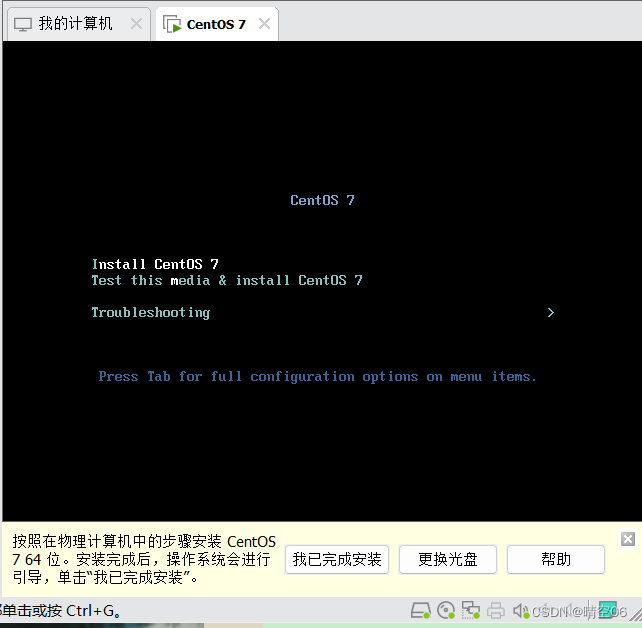

安装盘显示异常
点击进去选择安装盘,默认自动的就行。点击“Done”
点击“NETWORK&HOST NAME”,打开下面的开关,并设置服务器名即可

5.CentOS配置
5.1.设置网络配置
这里之前已经设置打开了,可以确认一下网络是否正常,一般使用ping百度来确认。
[root@centos7 ~]# ping www.baidu.com
PING www.a.shifen.com (110.242.68.3) 56(84) bytes of data.
64 bytes from 110.242.68.3 (110.242.68.3): icmp_seq=1 ttl=128 time=9.50 ms
64 bytes from 110.242.68.3 (110.242.68.3): icmp_seq=2 ttl=128 time=9.80 ms
64 bytes from 110.242.68.3 (110.242.68.3): icmp_seq=3 ttl=128 time=10.4 ms
^C
--- www.a.shifen.com ping statistics ---
3 packets transmitted, 3 received, 0% packet loss, time 2004ms
rtt min/avg/max/mdev = 9.508/9.904/10.404/0.381 ms
查看本虚拟机ip。需要注意点是CentOS默认是"ip addr",没有"ifconfig"。
[root@centos7 ~]# ifconfig
-bash: ifconfig: command not found
[root@centos7 ~]# ip addr
1: lo:  mtu 65536 qdisc noqueue state UNKNOWN group default qlen 1000link/loopback 00:00:00:00:00:00 brd 00:00:00:00:00:00inet 127.0.0.1/8 scope host lovalid_lft forever preferred_lft foreverinet6 ::1/128 scope host valid_lft forever preferred_lft forever
2: ens33:  mtu 1500 qdisc pfifo_fast state UP group default qlen 1000link/ether 00:0c:29:34:d4:9b brd ff:ff:ff:ff:ff:ffinet 192.168.146.130/24 brd 192.168.146.255 scope global noprefixroute dynamic ens33valid_lft 1743sec preferred_lft 1743secinet6 fe80::4e6:1be:c7cf:4264/64 scope link noprefixroute valid_lft forever preferred_lft forever
所以需要先安装。还需要注意一点,安装时不是直接使用“yum -y install ifconfig”,会提示没有安装包,
[root@centos7 ~]# yum install ifconfig
Loaded plugins: fastestmirror
Loading mirror speeds from cached hostfile* base: mirrors.bupt.edu.cn* extras: mirrors.bupt.edu.cn* updates: mirrors.bupt.edu.cn
No package ifconfig available.
Error: Nothing to do
其实ifconfig对应的工具是“net-tools.x86_64”,可以使用yum的查询方式“yum search ifconfig”来查看对应的安装包名称。
[root@centos7 ~]# yum search ifconfig
Loaded plugins: fastestmirror
Loading mirror speeds from cached hostfile* base: mirrors.bupt.edu.cn* extras: mirrors.bupt.edu.cn* updates: mirrors.bupt.edu.cn
========================================= Matched: ifconfig ==========================================
net-tools.x86_64 : Basic networking tools
安装ifconfig工具
yum -y install net-tools.x86_64
5.2.设置防火墙
CentOS7默认使用的firewalld.为后面方便配置使用,我们给换成iptables。
查看防火墙状态
[root@centos7 ~]# systemctl status firewalld
● firewalld.service - firewalld - dynamic firewall daemonLoaded: loaded (/usr/lib/systemd/system/firewalld.service; enabled; vendor preset: enabled)Active: active (running) since Mon 2022-11-21 04:52:44 EST; 21min agoDocs: man:firewalld(1)Main PID: 710 (firewalld)CGroup: /system.slice/firewalld.service└─710 /usr/bin/python2 -Es /usr/sbin/firewalld --nofork --nopidNov 21 04:52:43 centos7 systemd[1]: Starting firewalld - dynamic firewall daemon...
Nov 21 04:52:44 centos7 systemd[1]: Started firewalld - dynamic firewall daemon.
Nov 21 04:52:44 centos7 firewalld[710]: WARNING: AllowZoneDrifting is enabled. This is considered an insecure c... now.
Hint: Some lines were ellipsized, use -l to show in full.
关闭firewalld防火墙
[root@centos7 ~]# systemctl stop firewalld
[root@centos7 ~]# systemctl status firewalld
● firewalld.service - firewalld - dynamic firewall daemonLoaded: loaded (/usr/lib/systemd/system/firewalld.service; enabled; vendor preset: enabled)Active: inactive (dead) since Mon 2022-11-21 05:18:32 EST; 3s agoDocs: man:firewalld(1)Process: 710 ExecStart=/usr/sbin/firewalld --nofork --nopid $FIREWALLD_ARGS (code=exited, status=0/SUCCESS)Main PID: 710 (code=exited, status=0/SUCCESS)Nov 21 04:52:43 centos7 systemd[1]: Starting firewalld - dynamic firewall daemon...
Nov 21 04:52:44 centos7 systemd[1]: Started firewalld - dynamic firewall daemon.
Nov 21 04:52:44 centos7 firewalld[710]: WARNING: AllowZoneDrifting is enabled. This is considered an insecure c... now.
Nov 21 05:18:32 centos7 systemd[1]: Stopping firewalld - dynamic firewall daemon...
Nov 21 05:18:32 centos7 systemd[1]: Stopped firewalld - dynamic firewall daemon.
Hint: Some lines were ellipsized, use -l to show in full.
禁用firewalld防火墙
[root@centos7 ~]# systemctl mask firewalld
Created symlink from /etc/systemd/system/firewalld.service to /dev/null.
安装iptables-services
[root@centos7 ~]# yum install iptables-services
Loaded plugins: fastestmirror
Loading mirror speeds from cached hostfile* base: mirrors.bupt.edu.cn* extras: mirrors.bupt.edu.cn* updates: mirrors.bupt.edu.cn
Resolving Dependencies
--> Running transaction check
---> Package iptables-services.x86_64 0:1.4.21-35.el7 will be installed
--> Finished Dependency ResolutionDependencies Resolved=======================================================================================================================Package                            Arch                    Version                        Repository             Size
=======================================================================================================================
Installing:iptables-services                  x86_64                  1.4.21-35.el7                  base                   52 kTransaction Summary
=======================================================================================================================
Install  1 PackageTotal download size: 52 k
Installed size: 23 k
Is this ok [y/d/N]: y
Downloading packages:
iptables-services-1.4.21-35.el7.x86_64.rpm                                                      |  52 kB  00:00:00
Running transaction check
Running transaction test
Transaction test succeeded
Running transactionInstalling : iptables-services-1.4.21-35.el7.x86_64                                                              1/1 Verifying  : iptables-services-1.4.21-35.el7.x86_64                                                              1/1 Installed:iptables-services.x86_64 0:1.4.21-35.el7                                                                             Complete!
设置开机启动
[root@centos7 ~]# systemctl enable iptables
Created symlink from /etc/systemd/system/basic.target.wants/iptables.service to /usr/lib/systemd/system/iptables.service.
开启iptables防火墙
service iptables start
关闭iptables防火墙
service iptables stop
本次搭建就到此,后续会有对相应要监控的组件的安装搭建说明。感谢您的关注!
em/basic.target.wants/iptables.service to /usr/lib/systemd/system/iptables.service.
开启iptables防火墙```bash
service iptables start
关闭iptables防火墙
service iptables stop
本次搭建就到此,后续会有对相应要监控的组件的安装搭建说明。感谢您的关注!