

小白开发微信小程序20--web api文档制作
1、什么是Swagger
Swagger 项目已于 2015 年捐赠给 OpenAPI 计划,自此它被称为 OpenAPI。 这两个名称可互换使用。 不过,“OpenAPI”指的是规范。 “Swagger”指的是来自使用 OpenAPI 规范的 SmartBear 的开放源代码和商业产品系列。
简而言之:OpenAPI 是一种规范。
Swagger 是一种使用 OpenAPI 规范的工具。 例如,OpenAPIGenerator 和 SwaggerUI
OpenAPI 规范是描述 API 功能的文档。 该文档基于控制器和模型中的 XML 和属性注释。 它是 OpenAPI 流的核心部分,用于驱动诸如 SwaggerUI 之类的工具
Swagger UI 提供了基于 Web 的 UI,它使用生成的 OpenAPI 规范提供有关服务的信息。 Swashbuckle 和 NSwag 均包含 Swagger UI 的嵌入式版本,因此可使用中间件注册调用将该嵌入式版本托管在 ASP.NET Core 应用中。 Web UI 如下所示:

接下来开搞,分别有java版和asp.net版
2、spring boot项目配置swagger
打开本教程的小白开发微信小程序19--网络API(java版)项目,地址:https://blog.csdn.net/hqwest/article/details/129555961
修改配置文件,增加一行

2、pom.xml文件添加依赖项

3、创建swagger配置类

SwaggerConfig.java代码
package com.west.webapidemo.config;import org.springframework.context.annotation.Bean;
import org.springframework.context.annotation.Configuration;
import springfox.documentation.builders.ApiInfoBuilder;
import springfox.documentation.builders.PathSelectors;
import springfox.documentation.builders.RequestHandlerSelectors;
import springfox.documentation.service.ApiInfo;
import springfox.documentation.spi.DocumentationType;
import springfox.documentation.spring.web.plugins.Docket;
import springfox.documentation.swagger2.annotations.EnableSwagger2;@Configuration
@EnableSwagger2
public class SwaggerConfig {@Beanpublic Docket createRestApi() {return new Docket(DocumentationType.SWAGGER_2).apiInfo(apiInfo()).select().apis(RequestHandlerSelectors.basePackage("com.west.webapidemo.controller")).paths(PathSelectors.any()).build();}/*** 创建该API的基本信息* 访问地址:http://localhost:8080/swagger-ui/index.html* @return*/private ApiInfo apiInfo() {return new ApiInfoBuilder().title("微信小程序项目").description("更多请关注项目组信息").termsOfServiceUrl("https://www.cnblogs.com/").version("1.0").build();}
}
4、创建一个实体类
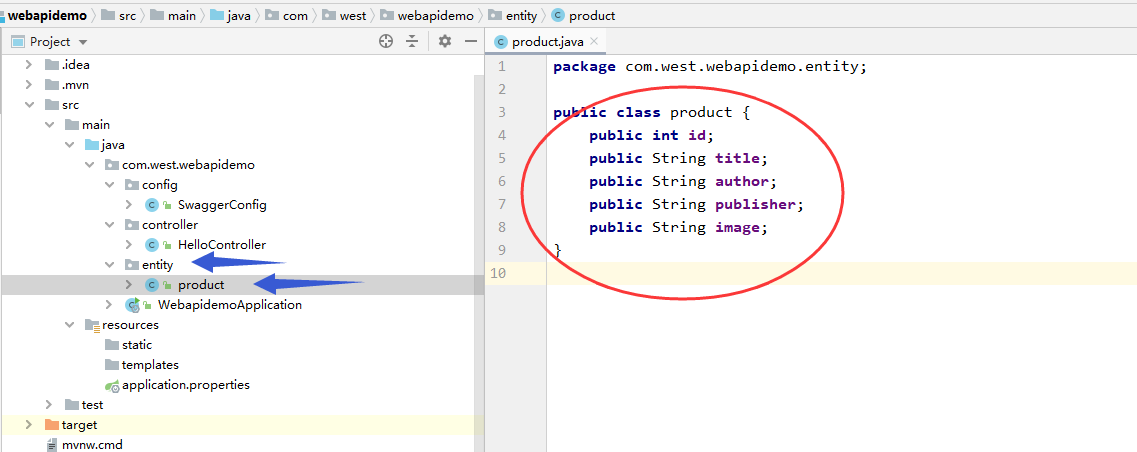
5、修改HelloController代码,增加方法和描述
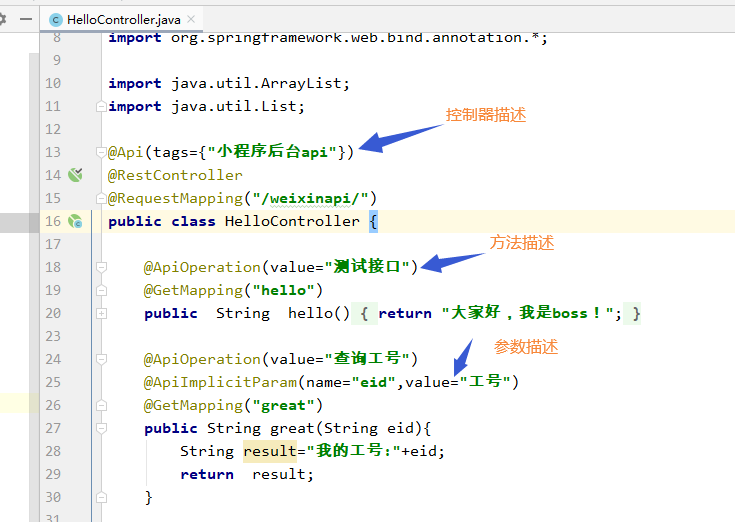
完整代码
package com.west.webapidemo.controller;import com.west.webapidemo.entity.product;
import io.swagger.annotations.Api;
import io.swagger.annotations.ApiImplicitParam;
import io.swagger.annotations.ApiOperation;
import org.springframework.web.bind.annotation.*;
import java.util.ArrayList;
import java.util.List;@Api(tags={"小程序后台api"})
@RestController
@RequestMapping("/weixinapi/")
public class HelloController {@ApiOperation(value="测试接口")@GetMapping("hello")public  String  hello(){return "大家好,我是boss!";}@ApiOperation(value="查询工号")@ApiImplicitParam(name="eid",value="工号")@GetMapping("great")public String great(String eid){String result="我的工号:"+eid;return  result;}/*** 查询图书数量* @param title 标题* @return 图书数据*/@ApiOperation(value="查询图书数量")@ApiImplicitParam(name="title",value="标题")@GetMapping("findbook")public String findbook(String title){return  "共有9本"+title+"图书.";}/*** 获取所有图书* @return*/@ApiOperation(value="获取所有图书列表")@GetMapping("findall")public List queryproducts(){List productList=getProdcuts();return  productList;}@ApiOperation(value="删除指定的图书")@DeleteMapping("delete")public void DeleteproductbyId(int id){//具体处理过程省略}private List getProdcuts() {List productList=new ArrayList();product p1=new product();p1.id=8807;p1.title="java开发入门";p1.author="蔡洪";p1.publisher="南方大学出版社";p1.image="img01.jpg";productList.add(p1);product p2=new product();p2.id=9053;p2.title="微信小程序教程";p2.author="张有平";p2.publisher="吉林出版社";p2.image="img02.jpg";productList.add(p2);product p3=new product();p3.id=6853;p3.title="html学习技术";p3.author="刘强西";p3.publisher="吉林出版社";p3.image="img03.jpg";productList.add(p3);return productList;}
}
6、启动项目,打开接口文档


7、小程序页面请求,获取图书列表,效果如下
1、wxml结构

2、wxss样式

3、js代码

// pages/myjava/myjava.js
Page({/*** 页面的初始数据*/data: { bklist: []},/*** 生命周期函数--监听页面加载*/onLoad(options) {this.getBookList();//调用方法},//获取图书列表getBookList() {var that = this;wx.request({url: 'http://localhost:8080/weixinapi/findall',data: {},method: "GET",header: {'content-type': 'application/json' // 默认值},success(txt) {//console.log(txt.data)that.setData({bklist: txt.data});}})}, /*** 生命周期函数--监听页面初次渲染完成*/onReady() {},/*** 生命周期函数--监听页面显示*/onShow() {},/*** 生命周期函数--监听页面隐藏*/onHide() {},/*** 生命周期函数--监听页面卸载*/onUnload() {},/*** 页面相关事件处理函数--监听用户下拉动作*/onPullDownRefresh() {},/*** 页面上拉触底事件的处理函数*/onReachBottom() {},/*** 用户点击右上角分享*/onShareAppMessage() {},//wx请求myapia() {wx.request({url: 'http://localhost:8080/weixinapi/hello', //接口地址data: {},header: {'content-type': 'application/json' // 默认值},success(res) {console.log(res.data)}})},//wx请求myapib() {wx.request({//http://localhost:8080/weixinapi/great?eid=809url: 'http://localhost:8080/weixinapi/great', //接口地址data: { eid: 531 },method: "GET",header: {'content-type': 'application/json' // 默认值},success(txt) {console.log(txt.data)}})},//wx请求myapic() {wx.request({url: 'http://localhost:8080/weixinapi/findbook', // 真实的接口地址data: { title: "手机维修" },method: "GET",header: {'content-type': 'application/json' // 默认值},success(txt) {console.log(txt.data)},fail() {console.log("网络有异常");}})},})
4、最后效果

3、asp.net core web api项目配置swagger文档
看“https://blog.csdn.net/hqwest/article/details/129559026”
小白开发微信小程序21--网络API(asp.net core版)
以及“https://blog.csdn.net/hqwest/article/details/129344051”
Asp.net core api swagger显示中文注释
屌丝终有逆袭日,木耳再无回粉时。