

k8s--Kubernetes存储--Secret配置管理
创始人
2024-06-02 19:52:14
文章目录
- 前言
- 一、简介
- 二、配置
- 1.默认secret
- 2.从文件创建
- 3.编写yaml文件
- 4.将Secret挂载到Volume中
- 5.向指定路径映射 secret 密钥
- 6.将Secret设置为环境变量
- 7.存储docker registry的认证信息
前言
一、简介
官方网址:https://kubernetes.io/zh-cn/docs/concepts/configuration/secret/
- Secret 对象类型用来保存敏感信息,例如密码、OAuth 令牌和 ssh key。
- 敏感信息放在 secret 中比放在 Pod 的定义或者容器镜像中来说更加安全和灵活。
- Pod 可以用两种方式使用 secret:作为 volume 中的文件被挂载到 pod 中的一个或者多个容器里。	当 kubelet 为 pod 拉取镜像时使用。
- Secret的类型:Service Account:Kubernetes 自动创建包含访问 API 凭据的 secret,并自动修改 pod 以使用此类型的 secret。		Opaque:使用base64编码存储信息,可以通过base64 --decode解码获得原始数据,因此安全性弱。		kubernetes.io/dockerconfigjson:用于存储docker registry的认证信息。
二、配置
1.默认secret
- 每个namespace下有一个名为default的默认的ServiceAccount对象
- ServiceAccount里有一个名为Tokens的可以作为Volume一样被Mount到Pod里的Secret,当Pod启动时这个Secret会被自动Mount到Pod的指定目录下,用来协助完成Pod中的进程访问API Server时的身份鉴权过程。
2.从文件创建
[root@k8s2 secret]# echo -n 'admin' > ./username.txt
[root@k8s2 secret]# echo -n 'westos' > ./password.txt
[root@k8s2 secret]# kubectl create secret generic db-user-pass --from-file=./username.txt --from-file=./password.txt
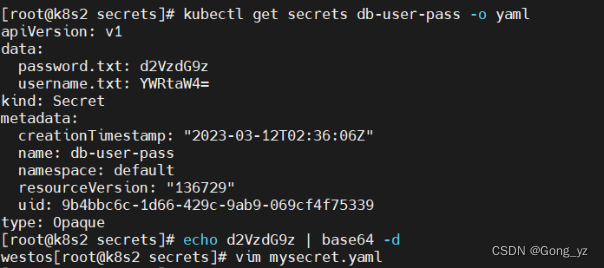
3.编写yaml文件
[root@k8s2 secret]# echo -n 'admin' | base64
YWRtaW4=
[root@k8s2 secret]# echo -n 'westos' | base64
d2VzdG9z[root@k8s2 secret]# vim mysecret.yaml
apiVersion: v1
kind: Secret
metadata:name: mysecret
type: Opaque
data:username: YWRtaW4=			#必须编码后的值password: d2VzdG9z[root@k8s2 secret]# kubectl apply -f mysecret.yaml
4.将Secret挂载到Volume中
[root@k8s2 secret]# vim pod1.yaml
apiVersion: v1
kind: Pod
metadata:name: mysecret
spec:containers:- name: nginximage: nginxvolumeMounts:- name: secretsmountPath: "/secret"readOnly: truevolumes:- name: secretssecret:secretName: mysecret[root@k8s2 secret]# kubectl apply  -f pod1.yaml[root@k8s2 secret]# kubectl get pod
NAME       READY   STATUS    RESTARTS   AGE
mysecret   1/1     Running   0          13s
[root@k8s2 secret]# kubectl exec  mysecret -- ls /secret
password
username
[root@k8s2 secret]# kubectl delete  -f pod1.yaml
5.向指定路径映射 secret 密钥
[root@k8s2 secret]# vim pod2.yaml
apiVersion: v1
kind: Pod
metadata:name: mysecret
spec:containers:- name: nginximage: nginxvolumeMounts:- name: secretsmountPath: "/secret"readOnly: truevolumes:- name: secretssecret:secretName: mysecretitems:- key: usernamepath: my-group/my-username[root@k8s2 secret]# kubectl apply -f pod2.yaml
[root@k8s2 secret]# kubectl exec  mysecret -- cat /secret/my-group/my-username
admin
[root@k8s2 secret]# kubectl delete  -f pod2.yaml
6.将Secret设置为环境变量
[root@k8s2 secrets]# vim pod3.yaml
apiVersion: v1
kind: Pod
metadata:name: secret-env
spec:containers:- name: pod3image: busyboxcommand: ["/bin/sh", "-c", "env"]env:- name: SECRET_USERNAMEvalueFrom:secretKeyRef:name: mysecretkey: username- name: SECRET_PASSWORDvalueFrom:secretKeyRef:name: mysecretkey: passwordrestartPolicy: Never[root@k8s2 secrets]# kubectl apply -f pod3.yaml
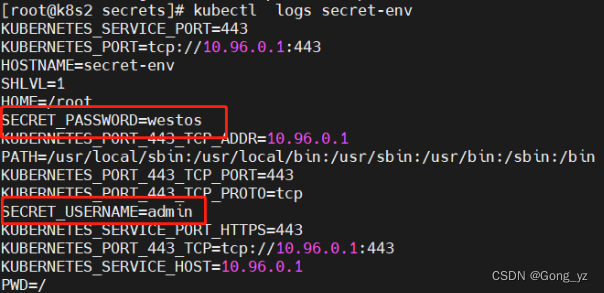
7.存储docker registry的认证信息
[root@k8s2 secret]# kubectl create secret docker-registry myregistrykey --docker-server=reg.westos.org --docker-username=admin --docker-password=westos --docker-email=hello@westos.org
新建私有仓库
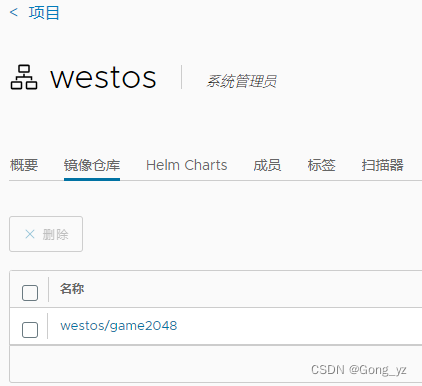
[root@k8s2 secret]# vim pod4.yaml
apiVersion: v1
kind: Pod
metadata:name: mypod
spec:containers:- name: game2048image: reg.westos.org/westos/game2048imagePullSecrets:                                ##没有这一部分是拉取不成功的- name: myregistrykey[root@k8s2 secret]# kubectl apply -f pod4.yaml
pod/mypod created
[root@k8s2 secret]# kubectl  get pod
NAME    READY   STATUS    RESTARTS   AGE
mypod   1/1     Running   0          3s[root@k8s2 secret]# kubectl  describe pod mypod    ##查看是否拉取成功的详细信息
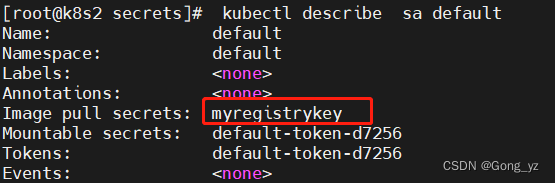
推荐把registrykey绑定到sa,这样yaml文件中就可以不用指定,更加安全。
[root@k8s2 secrets]# kubectl patch serviceaccount default -p ‘{“imagePullSecrets”: [{“name”: “myregistrykey”}]}’
相关内容
热门资讯
高德红外股价涨5.05%,招商...
1月12日,高德红外涨5.05%,截至发稿,报17.05元/股,成交25.09亿元,换手率4.42%...
美国专家热议豆包AI手机:引领...
来源:环球网 自2025年12月发布以来,豆包AI手机不仅在国内科技圈掀起热潮,成为持续刷屏的话题中...
高德红外股价涨5.05%,汇添...
1月12日,高德红外涨5.05%,截至发稿,报17.05元/股,成交25.17亿元,换手率4.43%...
杭华股份涨2.05%,成交额3...
1月12日,杭华股份盘中上涨2.05%,截至13:33,报7.96元/股,成交3335.88万元,换...
智洋创新股价涨5.2%,浙商基...
1月12日,智洋创新涨5.2%,截至发稿,报33.77元/股,成交1.43亿元,换手率1.89%,总...