

masstransit的message几个高级用法
1)问题,Class MessageA 基类,Class MessageB继承自MessageA;
用bus.Publish方法本想把有些消息只发给B队列,结果由于其继承关系A队列也获得了消息;
解决方法用send,
Uri uri = new Uri(RabbitMqUriQueueB);var endPoint = await _bus.GetSendEndpoint(uri);await endPoint.Send(MessageB);2)在rabbitmq中设置
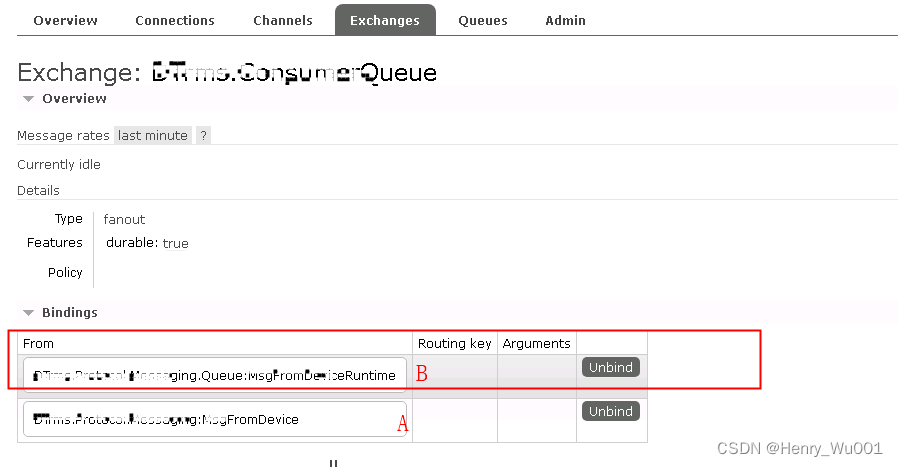
把B类型unbind掉,应该就可以了;
3)可能的其他方式
Message Topology · MassTransit

Message Topology
Message types are extensively leveraged in MassTransit, so making it easy to configure how those message types are used by topology seemed obvious.
Entity Name Formatters
Message Type
MassTransit 的exchanges,topics名称默认是消息名称,可以通过如下改为别名.
Bus.Factory.CreateUsingRabbitMq(cfg =>{    cfg.Message(x => {        x.SetEntityName("omg-we-got-one");    });
});
It's also possible to create a message-specific entity name formatter, by implementing IMessageEntityNameFormatter and specifying it during configuration.
class FancyNameFormatter :IMessageEntityNameFormatter
{public string FormatEntityName(){// seriously, please don't do this, like, ever.return type(T).Name.ToString();}
}Bus.Factory.CreateUsingRabbitMq(cfg =>
{cfg.Message(x =>{x.SetEntityNameFormatter(new FancyNameFormatter());});
});
It's also possible to replace the entity name formatter for the entire topology.
class FancyNameFormatter :IMessageEntityNameFormatter
{public string FormatEntityName(){// seriously, please don't do this, like, ever.return type(T).Name.ToString();}
}class FancyNameFormatter :IEntityNameFormatter
{public FancyNameFormatter(IEntityNameFormatter original){_original = original;}public string FormatEntityName(){if(T is OrderSubmitted)return "we-got-one";return _original.FormatEntityName();}
}Bus.Factory.CreateUsingRabbitMq(cfg =>
{cfg.Message(x =>{x.SetEntityNameFormatter(new FancyNameFormatter(cfg.MessageTopology.EntityNameFormatter));;});
});
Attributes
EntityName
通过EntityName 熟悉修改消息名称
[EntityName("order-submitted")]
public record LegacyOrderSubmittedEvent{}
ConfigureConsumeTopology
ConfigureConsumeTopology 可选属性,设置后决定这个消息类型对应的topic或exchange是否应该被创建并订阅到这个队列。
[ConfigureConsumeTopology(false)]
public record DeleteRecord{}
ExcludeFromTopology
ExcludeFromTopology 可选属性,决定这个消息类型实例发布时,这个消息的 topic 或 exchange 是否被创建。
如下例子中发布 ReformatHardDrive 命令不会在broker上创建 ICommand topic or exchange。
[ExcludeFromTopology]
public interface ICommand{}public record ReformatHardDrive : ICommand{}
不使用属性,可以在配置时设置:
...UsingRabbitMq((context,cfg) =>
{cfg.Publish(p => p.Exclude = true);
});
下一篇:mac系统手册(帮助/说明)