

NVIDIA 第七届 SkyHackathon(一)环境配置
创始人
2024-04-08 04:21:36
1.获取 NGC 秘钥
1)登录 NGC | NVIDIA GPU Cloud 官网,创建 NGC 用户并登录
2)在右上角用户名的下拉界面点击 setup

3)进入 setup 页后生成 NGC 秘钥并做好记录,该秘钥在模型训练过程以及推理过程都会使用到,且只有在创建时可看到秘钥内容,无法后续进行查询

2.下载训练脚本
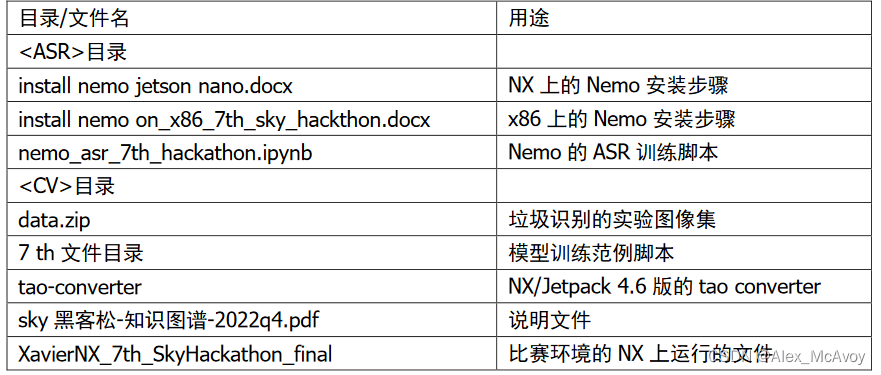
下载大赛网盘中相应的资料,资料目录结构说明如下:
3.配置 NVIDIA GPU 模型训练与优化环境
3.1 系统要求
x86 CPU + NVIDIA GPU + Ubuntu 18.04 以上
3.2 安装 NVIDIA 驱动
NVIDIA 驱动要求 460 以上版本,安装完成后需要重启,重启完后执行 nvidia-smi 检查驱动
root@Alex-McAvoy:~$ apt-get install software-properties-common
root@Alex-McAvoy:~$ add-apt-repository ppa:graphics-drivers/ppa
root@Alex-McAvoy:~$ apt-get install nvidia-driver-460
root@Alex-McAvoy:~$ reboot
3.3 安装 docker
关于 docker,详见:docker 手册,命令图解如下:
 安装完毕后,使用
 docker run hello-world 测试是否安装成功
root@Alex-McAvoy:~$ apt-get install -y ca-certificates curl gnupg lsb-release
root@Alex-McAvoy:~$ curl -fsSL https://download.docker.com/linux/ubuntu/gpg | sudo gpg --dearmor -o
/usr/share/keyrings/docker-archive-keyring.gpg
root@Alex-McAvoy:~$ echo "deb [arch=$(dpkg --print-architecture) signed-by=/usr/share/keyrings/docker-archive-keyring.gpg] https://download.docker.com/linux/ubuntu $(lsb_release -cs)stable" | sudo tee /etc/apt/sources.list.d/docker.list > /dev/null
root@Alex-McAvoy:~$ apt-get update
root@Alex-McAvoy:~$ apt-get install -y docker-ce docker-ce-cli containerd.io
当出现以下信息后,说明 docker 安装成功

3.4 安装 nvidia-docker2
安装完毕后,使用 docker run --rm --gpus all nvidia/cuda:11.0.3-base-ubuntu20.04 nvidia-smi 测试是否安装成功
root@Alex-McAvoy:~$ curl -s -L https://nvidia.github.io/nvidia-docker/gpgkey | apt-key add -distribution=$(. /etc/os-release;echo $ID$VERSION_ID)
root@Alex-McAvoy:~$ curl -s -L https://nvidia.github.io/nvidia-docker/$distribution/nvidia-docker.list | tee /etc/apt/sources.list.d/nvidia-docker.list
root@Alex-McAvoy:~$ apt-get update && apt-get install -y nvidia-docker2
root@Alex-McAvoy:~$ systemctl restart docker
当出现以下信息后,说明 nvidia-docker2 安装成功

3.5 登录 NGC
root@Alex-McAvoy:~$ docker login -u '$oauthtoken' --password-stdin nvcr.io <<< '申请的密钥'
3.6 安装 MiniConda3
root@Alex-McAvoy:~$ export DL_SITE=https://mirrors.tuna.tsinghua.edu.cn/anaconda/miniconda
root@Alex-McAvoy:~$ wget -c $DL_SITE/Miniconda3-py38_4.10.3-Linux-x86_64.sh
root@Alex-McAvoy:~$ bash Miniconda3-py38_4.10.3-Linux-x86_64.sh
root@Alex-McAvoy:~$ source ~/.bashrc
3.7 Jupyterlab 开发环境
root@Alex-McAvoy:~$ pip install jupyter jupyterlab
root@Alex-McAvoy:~$ export PW='登录密码'
root@Alex-McAvoy:~$ python3 -c "from notebook.auth.security import set_password; set_password('$PW','$HOME/.jupyter/jupyter_notebook_config.json')"
4.安装 Nemo 1.4 语音工具
5.安装 TAO 模型训练工具
相关内容
热门资讯
智能网联汽车、机器人机器狗都来...
炒股就看金麒麟分析师研报,权威,专业,及时,全面,助您挖掘潜力主题机会! (来源:封面新闻)封...
茉莉花开·艺润溧水|南京溧水和...
转自:扬子晚报活动现场扬子晚报网 2月15日讯(记者 姜婧仪 通讯员 和宣)为传承中华优秀传统文化,...
除夕相聚秋霞圃
赵春华 年年除夕在家过,唯独这一个除夕浪在秋霞圃,因而特别地记得。 此时,万花凋了,只有...
冰刃之上,拼搏遗憾皆本色
折戟短道速滑2000米混合接力,男子1500米意外出局,刘少昂的一句“这就是短道速滑”,道尽了这项运...
迎新纳福年夜饭
今天,上海遐福养老院张灯结彩,喜气洋洋。爷爷奶奶欢聚一堂迎新纳福吃年夜饭,15个大圆桌,200位老人...