

vben admin 中 BasicTable 组件 useTable 的使用
创始人
2024-04-07 04:19:03
vben admin 中 BasicTable 组件 useTable 的使用
- 前期准备表格数据以及 API
- 准备表头数据
- 准备表格中的数据
- 准备API
- 一、在 index.vue 当中使用 BasicTable 以及 useTable
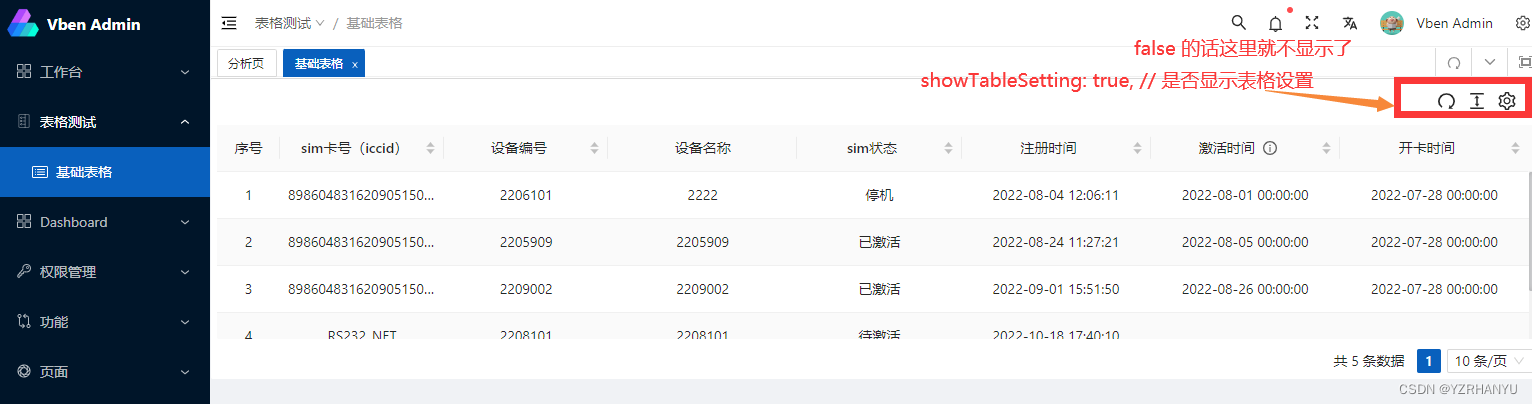
- 二、实现效果
前期准备表格数据以及 API
准备表头数据
这里采用在外部的文件当中定义表头数据,当需要使用的时候,引入就可以了
export function getBasicColumns2(): BasicColumn[] {return [{title: 'sim卡号(iccid)',dataIndex: 'iccid',sorter: true,width: 130,align: 'center',},{title: '设备编号',dataIndex: 'deviceId',sorter: true,width: 130,align: 'center',},{title: '设备名称',dataIndex: 'deviceName',width: 150,align: 'center',},{title: 'sim状态',dataIndex: ['state', 'text'],sorter: true,width: 130,align: 'center',},{title: '注册时间',dataIndex: 'createTime',sorter: true,width: 150,format: 'date|YYYY-MM-DD HH:mm:ss',},{title: '激活时间',dataIndex: 'activeDate',sorter: true,width: 150,helpMessage: '激活后系统会有10-15分钟延迟,请耐心等待',format: 'date|YYYY-MM-DD HH:mm:ss',},{title: '开卡时间',dataIndex: 'openDate',sorter: true,width: 150,format: 'date|YYYY-MM-DD HH:mm:ss',},];
}
准备表格中的数据
可以通过请求来获取
也可以在页面中定义
也可以在外部定义,然后在页面中引入
这里通过 mock 来模拟了测试的数据
list: [{id: '1555042387559780352',deviceId: '2206101',deviceName: '2222',iccid: '89860483162090515058',msisdn: '1440832155058',imsi: '460080321505058',state: { text: '停机', value: 'stop' },fakeState: { text: '待激活', value: 'notActive' },createTime: 1.659585971141e12,activeDate: 1.6592832e12,openDate: 1.6589376e12,modifyTime: 1.659585971141e12,},{id: '1562280375538700288',deviceId: '2205909',deviceName: '2205909',iccid: '89860483162090515069',msisdn: '1440832155069',imsi: '460080321505069',state: { text: '已激活', value: 'activated' },fakeState: { text: '待激活', value: 'notActive' },createTime: 1.661311641949e12,activeDate: 1.6596288e12,openDate: 1.6589376e12,modifyTime: 1.661311641949e12,},{id: '1565246034465939456',deviceId: '2209002',deviceName: '2209002',iccid: '89860483162090515062',msisdn: '1440832155062',imsi: '460080321505062',state: { text: '已激活', value: 'activated' },fakeState: { text: '待激活', value: 'notActive' },createTime: 1.662018710137e12,activeDate: 1.6614432e12,openDate: 1.6589376e12,modifyTime: 1.662018710137e12,},{id: '1582305527906983936',deviceId: '2208101',deviceName: '2208101',iccid: 'RS232_NET',imsi: 'RS232_NET',state: { text: '待激活', value: 'notActive' },fakeState: { text: '待激活', value: 'notActive' },createTime: 1.666086010323e12,modifyTime: 1.666086010323e12,},{id: '1582546476625059840',deviceId: '2208102',deviceName: '皮带秤-网线',iccid: 'RS232_NET',imsi: 'RS232_NET',state: { text: '待激活', value: 'notActive' },fakeState: { text: '待激活', value: 'notActive' },createTime: 1.666143456976e12,modifyTime: 1.666143456976e12,},],
准备API
mock 如何模拟数据在另一篇文章中有记录 vben admin 当中使用 mock 模拟数据以及对响应数据进行处理
import { defHttp } from '/@/utils/http/axios';
import { BasicModel, Page } from '/@/api/model/baseModel';enum Api {SIM_DATA_LIST = '/v1/device/sim/_query',
}export interface SimCard extends BasicModel {configName?: string; // 名称configKey?: string; // 参数键configValue?: string; // 参数值isSys?: string; // 系统内置(1是 0否)
}
//获取sim卡信息的接口
export const getSimDataList = (params?: SimCard | any) =>defHttp.postJson>({url: Api.SIM_DATA_LIST,params,});
一、在 index.vue 当中使用 BasicTable 以及 useTable
先定义 registerTable
以上是最基础的配置,更多的配置可以看看官网,这里只是问了让表格展示粗来~
二、实现效果
下一篇:solidity笔记
相关内容
热门资讯
乔迁主持词范文 乔迁主持词范文...
乔迁主持词范文尊敬的各位来宾、女士们、先生们:大家中午好!深冬白雪皑皑,吉日乔迁宝财(宝财花园)。在...
八十大寿庆贺仪式主持词 母亲八...
八十大寿庆贺仪式主持词各位来宾、各位亲朋、各位乡亲:上午好!天寒心暖天伦乐,欢声笑语寿满堂!今天是二...
最新或2023(历届)职代会开...
职代会开幕词尊敬的市公司领导、各位代表、同志们: 辞旧岁硕果累累,迎新春号角声声!经过输电工区...
载誉归来仪式主持稿范文 愿载誉...
载誉归来仪式主持稿范文同志们: 张**同志于 月日 至 月日 到北京参加全国军转表彰大会。受到了h...
原创 民...
1912年,中华民国宣布成立后,全国共有22个省,那你知道这22个省的都督都是谁吗?最终结局又都如何...