

SpringBoot--网上商城项目(自定义的参数解析器、购物车后台前台功能、商品详情页)
目录
一、自定义的参数解析器
关于Mybatis-plus时间字段代码生成问题
报错信息:Caused by: java.lang.IllegalStateException: No typehandler found for property xxx
二、购物车后台
三、商品详情页
四、商品详情页加入购物车
五、购物车删除功能
六、购物车修改功能
一、自定义的参数解析器
footer.html
function check() {$.get('/shopCar/check',{},function(rs){if(rs.code!=200){alert('请先登录后再购买商品!');}elselocation.href='/shopCar/queryShopCar';},'json');
}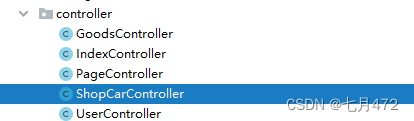
ShopCarController
package com.xiaokun.spbootpro.controller;import com.xiaokun.spbootpro.exception.BusinessException;
import com.xiaokun.spbootpro.model.User;
import com.xiaokun.spbootpro.service.IRedisService;
import com.xiaokun.spbootpro.utils.JsonResponseBody;
import com.xiaokun.spbootpro.utils.JsonResponseStatus;
import org.springframework.beans.factory.annotation.Autowired;
import org.springframework.web.bind.annotation.CookieValue;
import org.springframework.web.bind.annotation.RequestMapping;
import org.springframework.web.bind.annotation.RestController;/*** @author 小坤* @create 2022-11-09-10:19*/
@RestController
@RequestMapping("/shopCar")
public class ShopCarController {@Autowiredprivate IRedisService redisService;@RequestMapping("/check")public JsonResponseBody check(@CookieValue("token") String token){if(token == null)throw new BusinessException(JsonResponseStatus.TOKEN_EEROR);User user=redisService.getUserToRedis(token);if(user == null)throw new BusinessException(JsonResponseStatus.TOKEN_EEROR);return  new JsonResponseBody();}}
关于Mybatis-plus时间字段代码生成问题
org.springframework.data.redis.serializer.SerializationException: Could not read JSON: Cannot construct instance of `java.time.LocalDateTime` (no Creators, like default constructor, exist): cannot deserialize from Object value (no delegate- or property-based Creator)
at [Source: (byte[])"{"@class":"com.zking.testspbootpro.model.User","nickname":"小胖","password":"6502cbf0ac7d357831536b119ff26d28","salt":"7ceff545c6944e5cb7da355ae6243939","registerDate":{"month":"DECEMBER","year":2021,"dayOfMonth":11,"hour":2,"minute":36,"monthValue":12,"nano":0,"second":56,"dayOfWeek":"SATURDAY","dayOfYear":345,"chronology":{"@class":"java.time.chrono.IsoChronology","id":"ISO","calendarType":"iso8601"}},"lastLoginDate":null,"loginCount":0}"; line: 1, column: 172] (through reference chain: com.zking.testspbootpro.model.User["registerDate"]); nested exception is com.fasterxml.jackson.databind.exc.InvalidDefinitionException: Cannot construct instance of `java.time.LocalDateTime` (no Creators, like default constructor, exist): cannot deserialize from Object value (no delegate- or property-based Creator)
at [Source: (byte[])"{"@class":"com.zking.testspbootpro.model.User","nickname":"小胖","password":"6502cbf0ac7d357831536b119ff26d28","salt":"7ceff545c6944e5cb7da355ae6243939","registerDate":{"month":"DECEMBER","year":2021,"dayOfMonth":11,"hour":2,"minute":36,"monthValue":12,"nano":0,"second":56,"dayOfWeek":"SATURDAY","dayOfYear":345,"chronology":{"@class":"java.time.chrono.IsoChronology","id":"ISO","calendarType":"iso8601"}},"lastLoginDate":null,"loginCount":0}"; line: 1, column: 172] (through reference chain: com.zking.testspbootpro.model.User["registerDate"])

出现上述错误,原因是使用了lastLoginDate,改成java.util.Date;改完之后为了避免干扰将redis中的数据以及cookie(浏览器缓存)中的数据清空,再次登录测试;

小编还遇到了一个错,可以看一下
报错信息:Caused by: java.lang.IllegalStateException: No typehandler found for property xxx
原因:
在相应的xml里的resultMap标签里的result标签里的property属性的值没有在实体类里找到,即property的值没有和实体类的属性名相对应,原因可能是写错了
解决办法:
进入相应的xml文件里,把该报错的值与实体类的属性对照,看是否写错了,如果写错则改成实体类有的属性
ShopCarController使用参数解析器之前的做法弊端
在每一个需要登录之后才能操作的功能,都需要做用户登录验证,即以下代码都需要写一遍
更改后的ShopCarController
package com.xiaokun.spbootpro.controller;import com.xiaokun.spbootpro.exception.BusinessException;
import com.xiaokun.spbootpro.model.User;
import com.xiaokun.spbootpro.service.IRedisService;
import com.xiaokun.spbootpro.utils.JsonResponseBody;
import com.xiaokun.spbootpro.utils.JsonResponseStatus;
import org.springframework.beans.factory.annotation.Autowired;
import org.springframework.web.bind.annotation.CookieValue;
import org.springframework.web.bind.annotation.RequestMapping;
import org.springframework.web.bind.annotation.RestController;/*** @author 小坤* @create 2022-11-09-10:19*/
@RestController
@RequestMapping("/shopCar")
public class ShopCarController {@Autowiredprivate IRedisService redisService;/*** 使用参数解析器之前的做法弊端* 在每一个需要登录之后才能操作的功能,都需要做用户登录验证,即以下代码都需要写一遍* @param token* @return*/
//    @RequestMapping("/check")
//    public JsonResponseBody check(@CookieValue("token") String token){
//        if(token == null)
//            throw new BusinessException(JsonResponseStatus.TOKEN_EEROR);
//            User user=redisService.getUserToRedis(token);
//         if(user == null)
//             throw new BusinessException(JsonResponseStatus.TOKEN_EEROR);
//        return  new JsonResponseBody();
//    }/*** 带了user,会自动进入参数解析器supportsParameter* @param user* @return*/@RequestMapping("/check")public JsonResponseBody check(User user){return  new JsonResponseBody();}}
参数解析器类

package com.xiaokun.spbootpro.config;import com.xiaokun.spbootpro.exception.BusinessException;
import com.xiaokun.spbootpro.model.User;
import com.xiaokun.spbootpro.service.IRedisService;
import com.xiaokun.spbootpro.utils.CookieUtils;
import com.xiaokun.spbootpro.utils.JsonResponseStatus;
import org.springframework.beans.factory.annotation.Autowired;
import org.springframework.core.MethodParameter;
import org.springframework.stereotype.Component;
import org.springframework.stereotype.Controller;
import org.springframework.web.bind.support.WebDataBinderFactory;
import org.springframework.web.context.request.NativeWebRequest;
import org.springframework.web.method.support.HandlerMethodArgumentResolver;
import org.springframework.web.method.support.ModelAndViewContainer;
import org.springframework.web.servlet.HandlerExceptionResolver;import javax.servlet.http.HttpServletRequest;/*** @author 小坤* @create 2022-11-09-16:14** 凡是实现HandlerMethodArgumentResolver接口的类都是参数解析器类*/
@Component
public class UserArgumentResovler implements HandlerMethodArgumentResolver {@Autowiredprivate IRedisService redisService;/*** supportsParameter的方法的返回值,true:则会调用下面resolveArgument* false:不调用* @param methodParameter* @return*/@Overridepublic boolean supportsParameter(MethodParameter methodParameter) {return methodParameter.getParameterType() == User.class;}/*** resolveArgument:具体的业务代码处理* @param methodParameter* @param modelAndViewContainer* @param nativeWebRequest* @param webDataBinderFactory* @return* @throws Exception*/@Overridepublic Object resolveArgument(MethodParameter methodParameter, ModelAndViewContainer modelAndViewContainer, NativeWebRequest nativeWebRequest, WebDataBinderFactory webDataBinderFactory) throws Exception {HttpServletRequest request=(HttpServletRequest)nativeWebRequest.getNativeRequest();String token=CookieUtils.getCookieValue(request,"token");if(token == null)throw new BusinessException(JsonResponseStatus.TOKEN_EEROR);User user=redisService.getUserToRedis(token);if(user == null)throw new BusinessException(JsonResponseStatus.TOKEN_EEROR);return user;}
}
WebMvcConfigurer 资源映射器、相当于web.xml

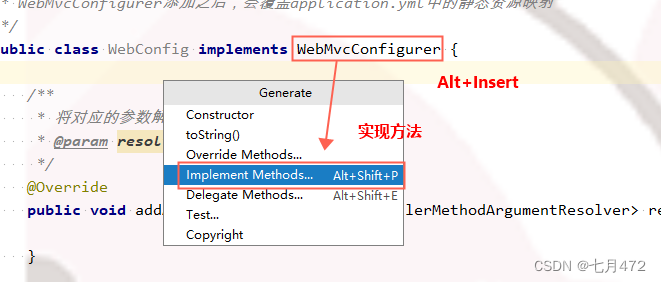
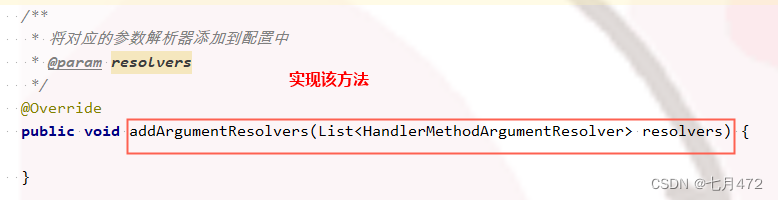
WebMvcConfigurer添加之后,会覆盖application.yml中的静态资源映射⬇⬇

所以需要重新去添加配置,固定配置,按需拷贝咯
package com.xiaokun.spbootpro.config;import org.springframework.beans.factory.annotation.Autowired;
import org.springframework.context.annotation.Configuration;
import org.springframework.web.method.support.HandlerMethodArgumentResolver;
import org.springframework.web.servlet.config.annotation.ResourceHandlerRegistry;
import org.springframework.web.servlet.config.annotation.WebMvcConfigurer;import java.util.List;/*** @author 小坤* @create 2022-11-09-16:41** WebMvcConfigurer添加之后,会覆盖application.yml中的静态资源映射*/
@Configuration
public class WebConfig implements WebMvcConfigurer {@Autowiredprivate UserArgumentResovler userArgumentResovler;/*** 配置静态资源访问映射,使用了WebMvcConfigurer会覆盖原有的application.yml文件中的静态资源配置* @param registry*/@Overridepublic void addResourceHandlers(ResourceHandlerRegistry registry) {registry.addResourceHandler("/static/**").addResourceLocations("classpath:/static/");}/*** 添加自定义的参数解析器* @param resolvers*/@Overridepublic void addArgumentResolvers(List resolvers) {resolvers.add(userArgumentResovler);}
}
凡是controller中的方法中包含参数User,都会进参数解析器UserArgumentResovler中的resolveArgument方法;这样一定程度下可以减少用户信息登录检验;
当然,我们也可以通过拦截器、过滤器、aop等方式,来解决这一类问题
修改配置类后建议重启一下项目 !!!
 我在user中加了一个id字段
二、购物车后台
定义购物车对象ShopCar
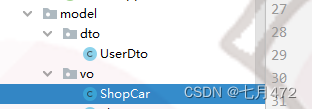
1.1购物车中商品集合
定义购物车商品详情对象ShopCarItem
商品ID/商品名称/商品单价/商品图片/商品数量/小计计算方法
1.2加入购物车
1.3删除购物车中指定商品
1.4更新购物车中商品数量
1.5清空购物车
1.6总价计算
package com.xiaokun.spbootpro.model.vo;import java.util.ArrayList;
import java.util.Arrays;
import java.util.List;
import java.util.ListIterator;/*** @author 小坤* @create 2022-11-10-14:49** 购物车对象    vo:view object**/
public class ShopCar {//    1.1购物车中商品集合private List items=new ArrayList<>();//set get方法public List getItems() {return items;}public void setItems(List items) {this.items = items;}//增加//1.2加入购物车public void add(ShopCarItem shopCarItem){//循环遍历购物车集合for (ShopCarItem item : items) {//判断加入购物车中的商品ID与购物车中的商品ID是否一致if (item.getGid().equals(shopCarItem.getGid())) {//获取购物车中原有商品的数量,再进行+1Integer num = item.getQuantity();item.setQuantity(num + 1);return;}}//加入购物车items.add(shopCarItem);}//删除//1.3删除购物车中指定商品public void delete(String gids) {//将gids分割后转换成List集合List ids = Arrays.asList(gids.split(","));//获取商品集合迭代器对象ListIterator it = items.listIterator();//循环遍历迭代器while (it.hasNext()) {//获取迭代器元素并移动下标ShopCarItem shopCarItem = it.next();//判断购物车中的商品ID是否在被删除商品的ID集合中if (ids.contains(shopCarItem.getGid() + "")) {//删除商品it.remove();}}}//修改//1.4更新购物车中商品数量public void update(ShopCarItem shopCarItem){//循环遍历购物车集合for (ShopCarItem item : items) {if (shopCarItem.getGid().equals(item.getGid())){item.setQuantity(shopCarItem.getQuantity());}}}//    1.5清空购物车public void clear() {items.clear();}//    1.6总价计算
//    public BigDecimal total() {
//        BigDecimal total = new BigDecimal(0);
//        for (ShopCarItem item : items) {
//            total = total.add(item.smalltotal());
//        }
//        return total;
//    }}

package com.xiaokun.spbootpro.model.vo;import lombok.AllArgsConstructor;
import lombok.Data;
import lombok.NoArgsConstructor;import java.awt.*;
import java.math.BigDecimal;
import java.util.ArrayList;
import java.util.List;/*** @author 小坤* @create 2022-11-10-14:50** 购物车明细*/
@Data
@NoArgsConstructor
@AllArgsConstructor
public class ShopCarItem {
//商品id、商品名称、商品单价、商品数量、商品图片private Long gid;private String goodsName;private String goodsImg;private BigDecimal goodsPrice;private Integer quantity;/*** 这是个虚拟方法,用于计算商品的小计* 公式:商品的单价*数量=小计* @return*/public BigDecimal smalltotal(){BigDecimal num=new BigDecimal(quantity);return goodsPrice.multiply(num);}}
web层定义 ShopCarController
1) 从session中获取购物车对象ShopCar
注:根据当前登陆用户ID绑定购物车,确保一人一车
2) 加入购物车方法
3) 查询购物车商品方法
4) 删除购物车指定商品方法
5) 更新购物车商品数量方法
package com.xiaokun.spbootpro.controller;import com.baomidou.mybatisplus.core.conditions.query.QueryWrapper;
import com.xiaokun.spbootpro.exception.BusinessException;
import com.xiaokun.spbootpro.model.Goods;
import com.xiaokun.spbootpro.model.User;
import com.xiaokun.spbootpro.model.vo.ShopCar;
import com.xiaokun.spbootpro.model.vo.ShopCarItem;
import com.xiaokun.spbootpro.service.IGoodsService;
import com.xiaokun.spbootpro.service.IRedisService;
import com.xiaokun.spbootpro.utils.JsonResponseBody;
import com.xiaokun.spbootpro.utils.JsonResponseStatus;
import org.springframework.beans.factory.annotation.Autowired;
import org.springframework.stereotype.Controller;
import org.springframework.web.bind.annotation.CookieValue;
import org.springframework.web.bind.annotation.RequestMapping;
import org.springframework.web.bind.annotation.ResponseBody;
import org.springframework.web.bind.annotation.RestController;
import org.springframework.web.servlet.ModelAndView;import javax.servlet.http.HttpServletRequest;
import javax.servlet.http.HttpServletResponse;
import javax.servlet.http.HttpSession;/*** @author 小坤* @create 2022-11-09-10:19*/
@Controller
@RequestMapping("/shopCar")
public class ShopCarController {@Autowiredprivate IRedisService redisService;@Autowiredprivate IGoodsService goodsService;/*** 使用参数解析器之前的做法弊端* 在每一个需要登录之后才能操作的功能,都需要做用户登录验证,即以下代码都需要写一遍* @param token* @return*/
//    @RequestMapping("/check")
//    public JsonResponseBody check(@CookieValue("token") String token){
//        if(token == null)
//            throw new BusinessException(JsonResponseStatus.TOKEN_EEROR);
//            User user=redisService.getUserToRedis(token);
//         if(user == null)
//             throw new BusinessException(JsonResponseStatus.TOKEN_EEROR);
//        return  new JsonResponseBody();
//    }/*** 带了user,会自动进入参数解析器supportsParameter* @param user* @return*/@RequestMapping("/check")@ResponseBodypublic JsonResponseBody check(User user){return  new JsonResponseBody();}//私有方法  从session获取购物对象private ShopCar getShopCar(User user,HttpServletRequest request){HttpSession session=request.getSession();ShopCar shopCar = (ShopCar) session.getAttribute(user.getId() + "_shopCar");if (shopCar==null){shopCar=new ShopCar();session.setAttribute(user.getId() + "_shopCar",shopCar);}return shopCar;}//查询@RequestMapping("/queryShopCar")public ModelAndView queryShopCar(User user,HttpServletRequest request,HttpServletResponse response){ModelAndView mv=new ModelAndView();ShopCar shopCar=getShopCar(user,request);mv.addObject("shopCar",shopCar);mv.setViewName("cart.html");return mv;}//增加@RequestMapping("/add")@ResponseBodypublic JsonResponseBody add(User user,HttpServletRequest request,HttpServletResponse response,long gid){ModelAndView mv=new ModelAndView();ShopCar shopCar=getShopCar(user,request);Goods goods = goodsService.getOne(new QueryWrapper().eq("gid", gid));//初始化商品详情ShopCarItemShopCarItem item=new ShopCarItem();item.setQuantity(1);item.setGid(goods.getGid());item.setGoodsImg(goods.getGoodsImg());item.setGoodsName(goods.getGoodsName());item.setGoodsPrice(goods.getGoodsPrice());//加入购物车shopCar.add(item);return new JsonResponseBody();}//修改@RequestMapping("/update")@ResponseBodypublic JsonResponseBody update(User user,HttpServletRequest request,HttpServletResponse response,ShopCarItem shopCarItem){ModelAndView mv=new ModelAndView();ShopCar shopCar=getShopCar(user,request);shopCar.update(shopCarItem);return new JsonResponseBody();}//删除@RequestMapping("/delete")@ResponseBodypublic JsonResponseBody delete(User user,HttpServletRequest request,HttpServletResponse response,String gids){ModelAndView mv=new ModelAndView();ShopCar shopCar=getShopCar(user,request);shopCar.delete(gids);return new JsonResponseBody();}}
三、商品详情页
修改index.html
商品详情页的模板跳转地址如下
${ctx}/page/proDetail.html 先使用这个跳转地址,看是否可以跳转
index.html
<#include "common/head.html"><#include "common/top.html">![]()
![]()
![]()
![]()
![]()
![]()
![]()
![]()
![]()
![]()
![]()
![]()
![]()
<#if gt01?? && gt01?size gt 0><#list gt01?keys as key><#list gt01[key] as g>![]()
- ${g.goodsName}
- ¥ ${g.goodsPrice}
![]()
![]()
<#if gt07?? && gt07?size gt 0><#list gt07?keys as key><#list gt07[key] as g>![]()
- ${g.goodsName}
- ¥${g.goodsPrice}
<#include "common/footer.html"/>
可以跳转后,我们需要跳转后台controller加载数据
将对应controller层的代码编写好后,修改index.html中详情页的模板跳转地址${ctx}/goods/detail/${g.gid}
controller代码在下面
<#if gt01?? && gt01?size gt 0>
<#list gt01?keys as key><#list gt01[key] as g>![]()
- ${g.goodsName}
- ¥ ${g.goodsPrice}
<#if gt07?? && gt01?size gt 0>
<#list gt07?keys as key><#list gt07[key] as g>![]()
- ${g.goodsName}
- ¥${g.goodsPrice}
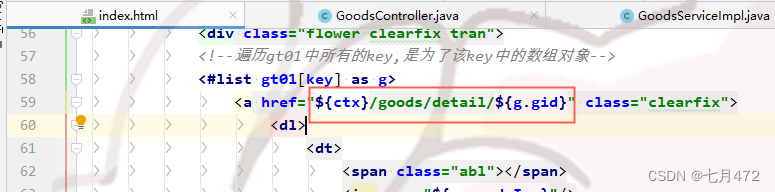 proDetail.html 商品详情页

跳转详情页不能返回RestController 使用ModelAndView所以必须换成Controller
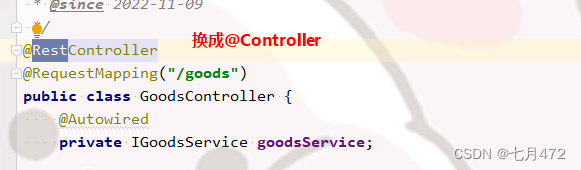
GoodsController
package com.xiaokun.spbootpro.controller;import com.baomidou.mybatisplus.core.conditions.query.QueryWrapper;
import com.xiaokun.spbootpro.model.Goods;
import com.xiaokun.spbootpro.service.IGoodsService;
import org.springframework.beans.factory.annotation.Autowired;
import org.springframework.stereotype.Controller;
import org.springframework.web.bind.annotation.PathVariable;
import org.springframework.web.bind.annotation.RequestMapping;import org.springframework.web.bind.annotation.RestController;
import org.springframework.web.servlet.ModelAndView;/*** * 商品信息表 前端控制器* ** @author xiaokun* @since 2022-11-09*/
@Controller
@RequestMapping("/goods")
public class GoodsController {@Autowiredprivate IGoodsService goodsService;@RequestMapping("/detail/{gid}")public ModelAndView detail(@PathVariable("gid") long gid){//根据商品ID查询单个商品信息Goods goods = goodsService.getOne(new QueryWrapper().eq("gid", gid));//将商品存入model带入前端展示ModelAndView mv=new ModelAndView();mv.addObject("goods",goods);//设置跳转页面,商品详情页mv.setViewName("proDetail.html");return mv;}}
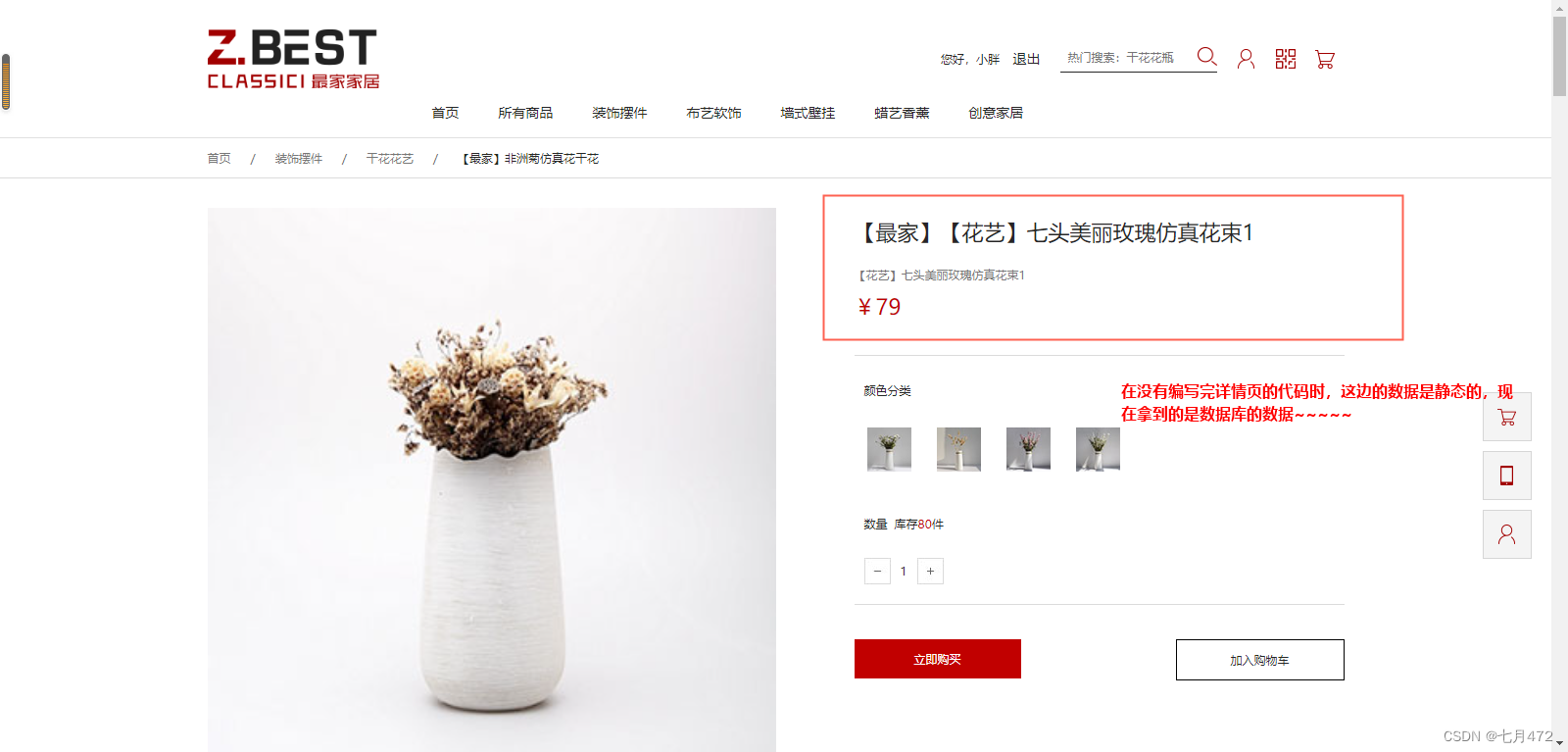
四、商品详情页加入购物车
点击加入购物车,商品详情页跳转到购物车页面并商品显示在购物车中
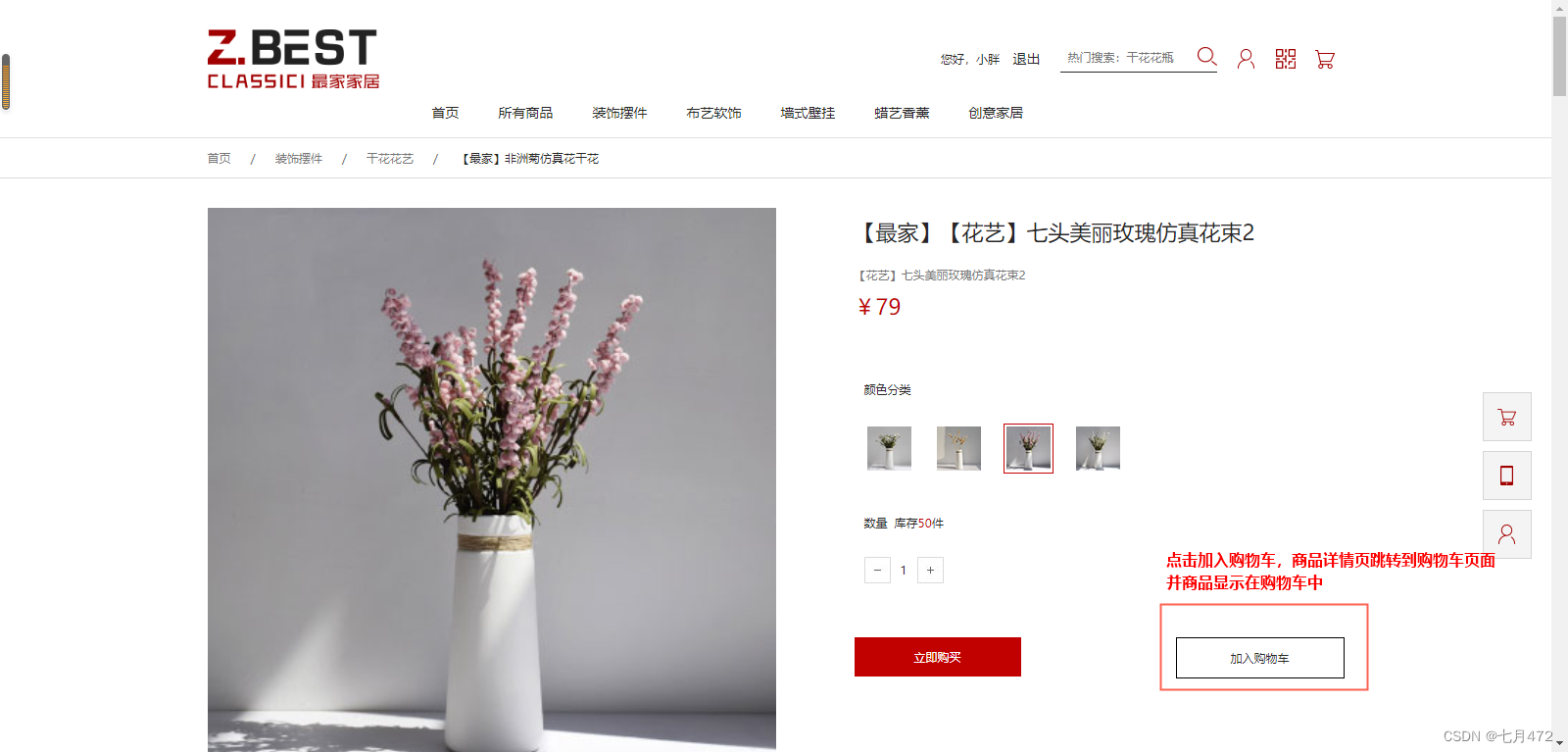
加入并展示购物车
$(function () {$(".cart").click(function () {$.get('/shopCar/add',{gid:$("#gids").val()},function(rs){if(rs.code!=200){alert('请先登录后再加购商品!');}elselocation.href='/page/cart.html';},'json');});})
添加这行
这样点击商品,就跳转到购物车了,接下来把加入购物车中的商品变活
<#if shopCar??><#list shopCar.items as g>即增加又查询

 这是我刚刚加入购物车的商品,数据变活ok

五、购物车删除功能
删除购物车中指定商品
1)点击删除按钮删除单个商品
2)全选商品删除部分或者全部商品

原cart.js
$(function(){/**************数量加减***************/$(".num .sub").click(function(){var num = parseInt($(this).siblings("span").text());if(num<=1){$(this).attr("disabled","disabled");}else{num--;$(this).siblings("span").text(num);//获取除了货币符号以外的数字var price = $(this).parents(".number").prev().text().substring(1);//单价和数量相乘并保留两位小数$(this).parents(".th").find(".sAll").text('¥'+(num*price).toFixed(2));jisuan();zg();}});$(".num .add").click(function(){var num = parseInt($(this).siblings("span").text());if(num>=5){confirm("限购5件");}else{num++;$(this).siblings("span").text(num);var price = $(this).parents(".number").prev().text().substring(1);$(this).parents(".th").find(".sAll").text('¥'+(num*price).toFixed(2));jisuan();zg();}});//计算总价function jisuan(){var all=0;var len =$(".th input[type='checkbox']:checked").length;if(len==0){$("#all").text('¥'+parseFloat(0).toFixed(2));}else{$(".th input[type='checkbox']:checked").each(function(){//获取小计里的数值var sAll = $(this).parents(".pro").siblings('.sAll').text().substring(1);//累加all+=parseFloat(sAll);//赋值$("#all").text('¥'+all.toFixed(2));})}}//计算总共几件商品function zg(){var zsl = 0;var index = $(".th input[type='checkbox']:checked").parents(".th").find(".num span");var len =index.length;if(len==0){$("#sl").text(0);}else{index.each(function(){zsl+=parseInt($(this).text());$("#sl").text(zsl);})}if($("#sl").text()>0){$(".count").css("background","#c10000");}else{$(".count").css("background","#8e8e8e");}}/*****************商品全选***********************/$("input[type='checkbox']").on('click',function(){var sf = $(this).is(":checked");var sc= $(this).hasClass("checkAll");if(sf){if(sc){$("input[type='checkbox']").each(function(){  this.checked=true;  }); zg();jisuan();}else{$(this).checked=true; var len = $("input[type='checkbox']:checked").length;var len1 = $("input").length-1;if(len==len1){$("input[type='checkbox']").each(function(){  this.checked=true;  }); }zg();jisuan();}}else{if(sc){$("input[type='checkbox']").each(function(){  this.checked=false;  }); zg();jisuan();}else{$(this).checked=false;var len = $(".th input[type='checkbox']:checked").length;var len1 = $("input").length-1;if(len修改';
//		$(this).addClass("on").append(html).parents(".th").siblings(".th").find(".pro dd").removeClass("on").find('.edit').remove();
//		$(".edit").each(function(i){
//			$(this).attr("id",'edit'+i);
//			$("#edit"+i).click(function(){
//				$(".proDets").show();
//				$(".mask").show();
//				$(".changeBtn .buy").attr("data-id",i);
//			})
//		})
//	},function(){
//		$(this).removeClass("on");
//	})
//	$(".changeBtn .buy").click(function(){
//		var index = $(this).attr("data-id");
//		var result = $(".smallImg .on").find("img").attr("alt");
//		$("#edit"+index).prev().text(result);
//		$(".proDets").hide();
//		$(".mask").hide();
//		$("#edit"+index).parent("dd").removeClass("on").find(".edit").remove();
//	});
//	$(".changeBtn .cart").click(function(){
//		$(".proDets").hide();
//		$(".mask").hide();
//	})
})
cart.js进行整改
//删除购物车商品
$('.del').click(function(){let gids = "";//单个删除if($(this).parent().parent().hasClass("th")){$(".mask").show();$(".tipDel").show();index = $(this).parents(".th").index()-1;//TODO 获取当前的checkbox中设置的隐藏域(包含了商品ID)gids=$(".th").eq(index).find('div:eq(0) input[type=hidden]').val();console.log(gids);$('.cer').click(function(){$(".mask").hide();$(".tipDel").hide();$(".th").eq(index).remove();$('.cer').off('click');if($(".th").length==0){$(".table .goOn").show();}//TODOdel(gids);})}else{//选中多个一起删除if($(".th input[type='checkbox']:checked").length==0){$(".mask").show();$(".pleaseC").show();}else{$(".mask").show();$(".tipDel").show();//TODO 先获取所有即将被删除的商品IDlet gidArr = new Array();$(".th input[type='checkbox']:checked").each(function(j) {index = $(this).parents('.th').index() - 1;//在这里需要获取当前行商品的商品IDgidArr.push($(".th").eq(index).find("div:eq(0) input[type='hidden']").val());});gids = gidArr.join(",");console.log(gids);$('.cer').click(function(){$(".th input[type='checkbox']:checked").each(function(j){index = $(this).parents('.th').index()-1;$(".th").eq(index).remove();if($(".th").length==0){$(".table .goOn").show();}})$(".mask").hide();$(".tipDel").hide();zg();jisuan();//TODOdel(gids);})}}
})#在页面初始化事件外添加删除方法
//删除商品
function del(gids){$.post('/shopCar/delete',{'gids':gids},function(rs){if(rs.code!=200)alert(rs.msg);elselocation.href='/shopCar/queryShopCar';},'json');
}
六、购物车修改功能
修改购物车中商品数量

cart.js进行整改
$(".num .sub").click(function(){var num = parseInt($(this).siblings("span").text());if(num<=1){$(this).attr("disabled","disabled");}else{num--;$(this).siblings("span").text(num);//获取除了货币符号以外的数字var price = $(this).parents(".number").prev().text().substring(1);//单价和数量相乘并保留两位小数$(this).parents(".th").find(".sAll").text('¥'+(num*price).toFixed(2));jisuan();zg();//TODO 获取当前行的行索引let index = $(this).parents(".th").index()-1;//获取当前的checkbox中设置的隐藏域(包含了商品ID)let gid=$(".th").eq(index).find('div:eq(0) input[type=hidden]').val();update(num,gid);}
});
$(".num .add").click(function(){var num = parseInt($(this).siblings("span").text());if(num>=5){confirm("限购5件");}else{num++;$(this).siblings("span").text(num);var price = $(this).parents(".number").prev().text().substring(1);$(this).parents(".th").find(".sAll").text('¥'+(num*price).toFixed(2));jisuan();zg();//TODO 获取当前行的行索引let index = $(this).parents(".th").index()-1;//获取当前的checkbox中设置的隐藏域(包含了商品ID)let gid=$(".th").eq(index).find('div:eq(0) input[type=hidden]').val();update(num,gid);}
});#在页面初始化事件外添加修改方法
//更新商品数量
function update(num,gid){$.post('/shopCar/update',{'gid':gid,'quantity':num},function(rs){if(rs.code!=200)alert(rs.msg);elselocation.href='/shopCar/queryShopCar';},'json');
}
最终版
$(function(){/**************数量加减***************/$(".num .sub").click(function(){var num = parseInt($(this).siblings("span").text());if(num<=1){$(this).attr("disabled","disabled");}else{num--;$(this).siblings("span").text(num);//获取除了货币符号以外的数字var price = $(this).parents(".number").prev().text().substring(1);//单价和数量相乘并保留两位小数$(this).parents(".th").find(".sAll").text('¥'+(num*price).toFixed(2));jisuan();zg();//TODO 获取当前行的行索引let index = $(this).parents(".th").index()-1;//获取当前的checkbox中设置的隐藏域(包含了商品ID)let gid=$(".th").eq(index).find('div:eq(0) input[type=hidden]').val();update(num,gid);}});$(".num .add").click(function(){var num = parseInt($(this).siblings("span").text());if(num>=5){confirm("限购5件");}else{num++;$(this).siblings("span").text(num);var price = $(this).parents(".number").prev().text().substring(1);$(this).parents(".th").find(".sAll").text('¥'+(num*price).toFixed(2));jisuan();zg();//TODO 获取当前行的行索引let index = $(this).parents(".th").index()-1;//获取当前的checkbox中设置的隐藏域(包含了商品ID)let gid=$(".th").eq(index).find('div:eq(0) input[type=hidden]').val();update(num,gid);}});//计算总价function jisuan(){var all=0;var len =$(".th input[type='checkbox']:checked").length;if(len==0){$("#all").text('¥'+parseFloat(0).toFixed(2));}else{$(".th input[type='checkbox']:checked").each(function(){//获取小计里的数值var sAll = $(this).parents(".pro").siblings('.sAll').text().substring(1);//累加all+=parseFloat(sAll);//赋值$("#all").text('¥'+all.toFixed(2));})}}//计算总共几件商品function zg(){var zsl = 0;var index = $(".th input[type='checkbox']:checked").parents(".th").find(".num span");var len =index.length;if(len==0){$("#sl").text(0);}else{index.each(function(){zsl+=parseInt($(this).text());$("#sl").text(zsl);})}if($("#sl").text()>0){$(".count").css("background","#c10000");}else{$(".count").css("background","#8e8e8e");}}/*****************商品全选***********************/$("input[type='checkbox']").on('click',function(){var sf = $(this).is(":checked");var sc= $(this).hasClass("checkAll");if(sf){if(sc){$("input[type='checkbox']").each(function(){  this.checked=true;  }); zg();jisuan();}else{$(this).checked=true; var len = $("input[type='checkbox']:checked").length;var len1 = $("input").length-1;if(len==len1){$("input[type='checkbox']").each(function(){  this.checked=true;  }); }zg();jisuan();}}else{if(sc){$("input[type='checkbox']").each(function(){  this.checked=false;  }); zg();jisuan();}else{$(this).checked=false;var len = $(".th input[type='checkbox']:checked").length;var len1 = $("input").length-1;if(len修改';
//		$(this).addClass("on").append(html).parents(".th").siblings(".th").find(".pro dd").removeClass("on").find('.edit').remove();
//		$(".edit").each(function(i){
//			$(this).attr("id",'edit'+i);
//			$("#edit"+i).click(function(){
//				$(".proDets").show();
//				$(".mask").show();
//				$(".changeBtn .buy").attr("data-id",i);
//			})
//		})
//	},function(){
//		$(this).removeClass("on");
//	})
//	$(".changeBtn .buy").click(function(){
//		var index = $(this).attr("data-id");
//		var result = $(".smallImg .on").find("img").attr("alt");
//		$("#edit"+index).prev().text(result);
//		$(".proDets").hide();
//		$(".mask").hide();
//		$("#edit"+index).parent("dd").removeClass("on").find(".edit").remove();
//	});
//	$(".changeBtn .cart").click(function(){
//		$(".proDets").hide();
//		$(".mask").hide();
//	})
})
//删除商品
function del(gids) {$.post('/shopCar/delete',{'gids':gids},function(rs){if(rs.code!=200)alert(rs.msg);elselocation.href='/shopCar/queryShopCar';},'json');
}//修改商品数量
function update(num,gid){$.post('/shopCar/update',{'gid':gid,'quantity':num},function(rs){if(rs.code!=200)alert(rs.msg);elselocation.href='/shopCar/queryShopCar';},'json');
}